Native audio + Tang Control · VST3 / AU
CELESTE Parallel
One source. Many textures.
Native stereo effect for Windows and Mac, with optional Tang Control: 44 CELESTE FPGA parameters automated from your DAW.
Windows x64 · macOS Universal (Apple Silicon + Intel) · 24.09.2026
From the board to the plugin →
Free VST3 plugin for Windows and Mac
What can I download?
CELESTE Parallel provides a Windows x64 ZIP and a macOS Universal ZIP for Apple Silicon and Intel. Mac includes VST3 and AU. Links on this page lead directly to the free files.
Can I hear it before installing?
The MP3 demo lets you hear an example of the native plugin without installing software or connecting an FPGA.
What do I need to run it?
A host or DAW compatible with the package’s format and operating system. Follow the installation guide and review test coverage before an important session. Tang Control is optional and requires the corresponding CELESTE hardware.
Hear the plugin
A 54-second demo rendered through the VST3 using Celestial Bloom, including its tail and a final fade.
Installation and connection
- Download and extract your system’s ZIP. Keep the .vst3 folder intact; Mac also includes an AU .component.
- Copy the plugin to the path below and rescan in your DAW. Mac uses an ad-hoc development signature without notarization.
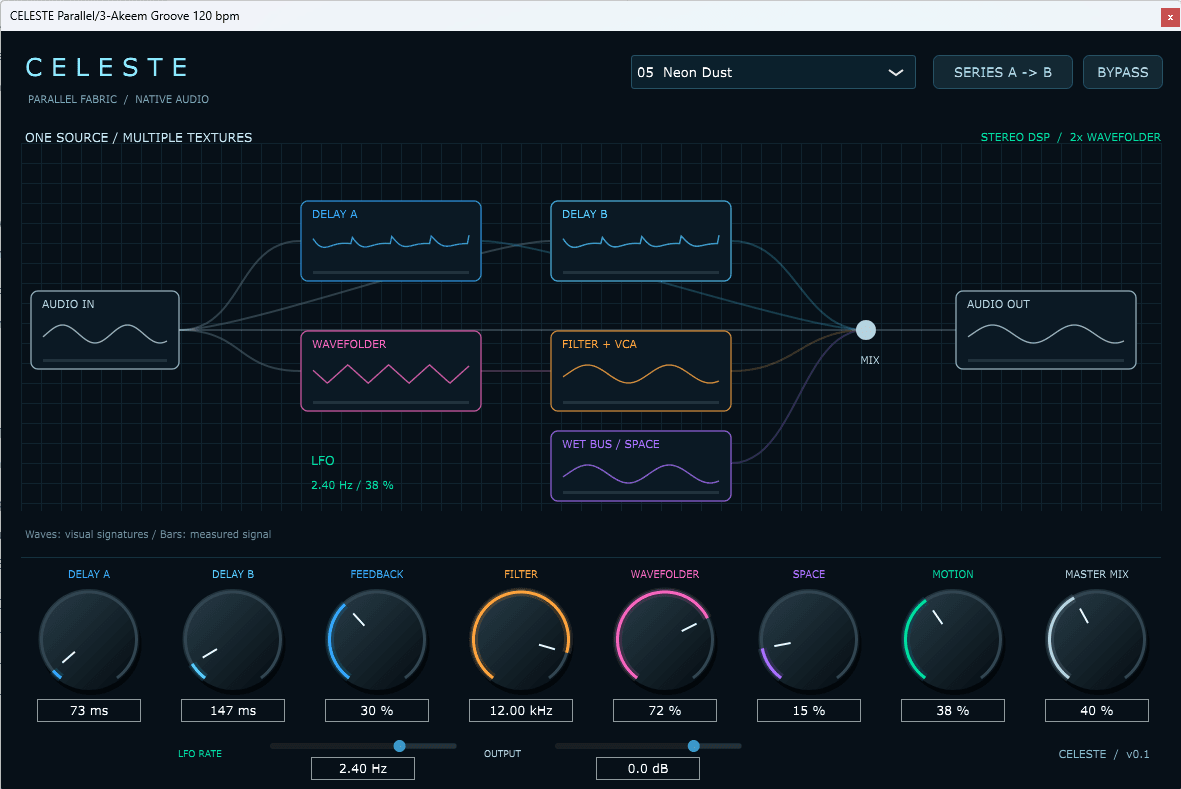
- For native DSP, insert on a stereo audio track and choose a preset. The screenshot shows this native editor.
- For Tang Control, disconnect the web serial port, open TANG CONTROL and connect. READ TANG imports hardware state; SEND SESSION explicitly sends saved values. Controller Only passes DAW audio through without native DSP.
- Recording the PCM5102 return requires an audio-interface line input. There is no USB audio return or automatic latency compensation.
C:\Program Files\Common Files\VST3~/Library/Audio/Plug-Ins/VST3/
~/Library/Audio/Plug-Ins/Components/Control guide
- Delay A / B: 20–1200 ms and 20–1600 ms. Shared feedback up to 85%. SERIES A → B chains the delays; when off, they run in parallel.
- Wavefolder: wavefolding with 2× oversampling. Filter: a low-pass filter on this branch, from 80 Hz to 18 kHz.
- Space: stereo reverb. Motion: filter and amplitude modulation. LFO Rate: 0.05–8 Hz, without BPM sync.
- Master Mix: dry/wet balance. Output: final gain. BYPASS returns the signal at unity gain.
- Double-click resets a knob. Enter values in the fields, automate parameters in your DAW and save the state in your session.
September 2026 edition
Windows x64 VST3 and macOS Universal VST3/AU, five native presets and Tang Control. Native DSP works without a board. Hardware control requires compatible Line-In firmware: PCM1808 → FPGA → PCM5102. USB does not return audio to the DAW.
Testing and scope
Windows: host tests at 44.1/48/96 kHz, state and Controller Only; final C++ controller tested with real Tang, 44 controls, write/restore and exclusive port access. Mac: VST3/AU builds and tests on Apple Silicon and Intel. Physical Mac serial and commercial DAW GUI remain untested. Mac signature is ad hoc, not notarized.
Package documents (Spanish)
SHA-256 · Windows ZIP
54ef00383579ac93247844c598e7cbd2259ff02b465293b2bff78b98977b58efSHA-256 · macOS ZIP
408a5f1be161487b9e770e221f7c02c649ae3702f941daef495e2e348359fdf1